



At a glance · AI connections
Your policy library, now inside Claude.
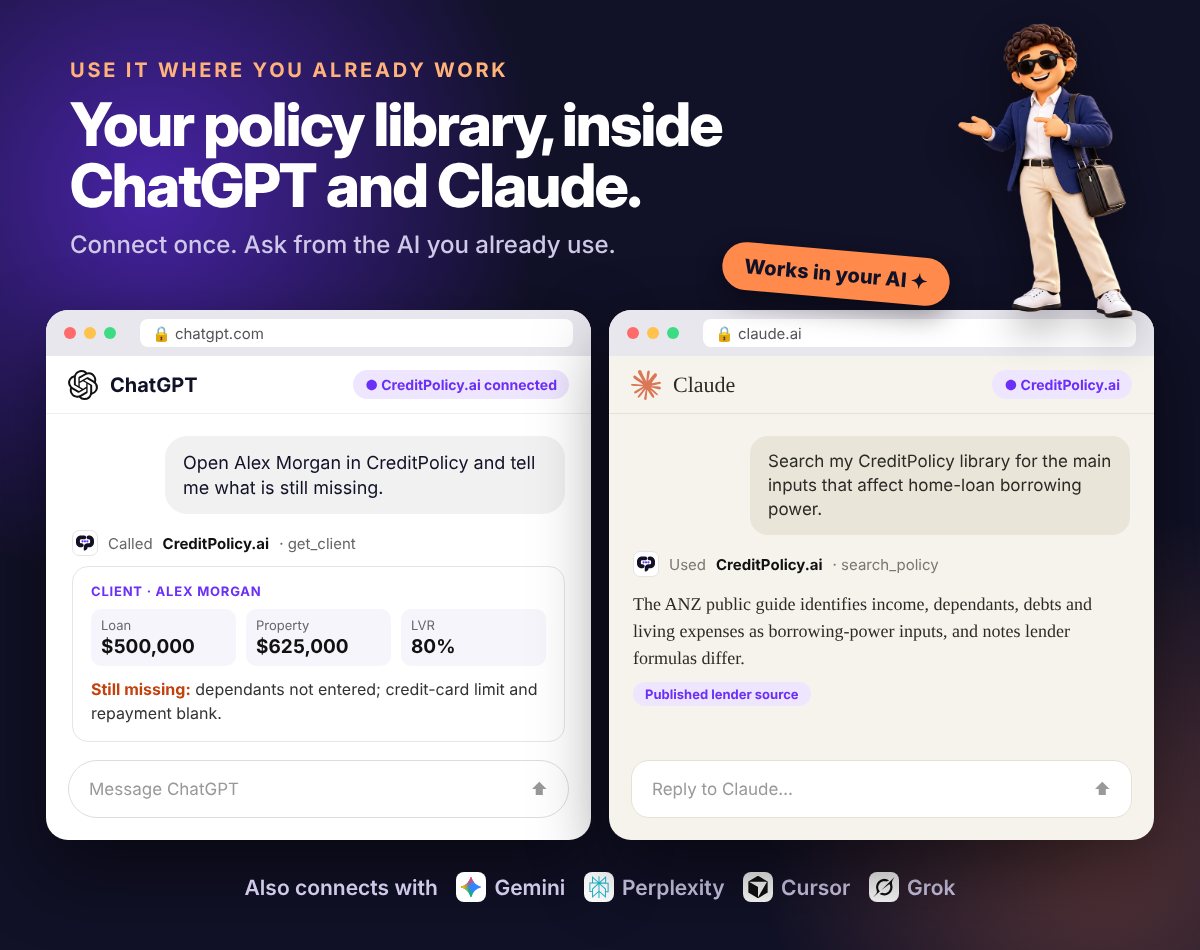
CreditPolicy.ai has been approved for Claude’s connector directory. Connect once, then ask cited lender-policy questions from the AI you already use.

What happens when you ask
You ask Claude
“Which lenders take casual income under 12 months in the role?”
Claude calls CreditPolicy
It searches the lenders’ own published policy, not the open internet.
search_policyYou get a cited answer
Lender by lender, with the source document named. Not in the library? It says so.

Technology · Sponsored by CreditPolicy.ai
CreditPolicy.ai lands in Claude’s connector directory. Your lender policy library is now one click from your AI.
It’s the first Australian lender-policy platform approved by Claude, with ChatGPT and Perplexity next in line. Here’s what it means for your desk, how to connect it in about a minute, and what to ask first.

Most brokers already have Claude or ChatGPT open somewhere on their screen. It drafts the client email, tidies the file note and summarises the bank statement. Then a policy question comes up, and you’re back to tabbing through lender PDFs, BDM emails and aggregator portals.
That gap just closed. CreditPolicy.ai has been accepted into Claude’s official connector directory. Any broker using Claude can now plug a live, cited library of Australian lender credit policy straight into their assistant in about a minute. No keys, no code, no IT ticket. Ask the policy question in the same conversation you’re already having, and the answer comes back from the lender’s own published wording with the source named.
It’s a first for Australian broking. And it changes what “using AI on a deal” can safely mean.
Key takeaways
- CreditPolicy.ai is now an approved connector in Claude’s directory, available on claude.ai, Claude Desktop and the Claude mobile app.
- ChatGPT and Perplexity directory listings are awaiting approval. Both already work today as a custom connector using creditpolicy.ai/api/mcp.
- Answers come from 100,000+ pages of lender policy across 160+ lenders and five lending types, every one cited. If it isn’t in the library, it says so.
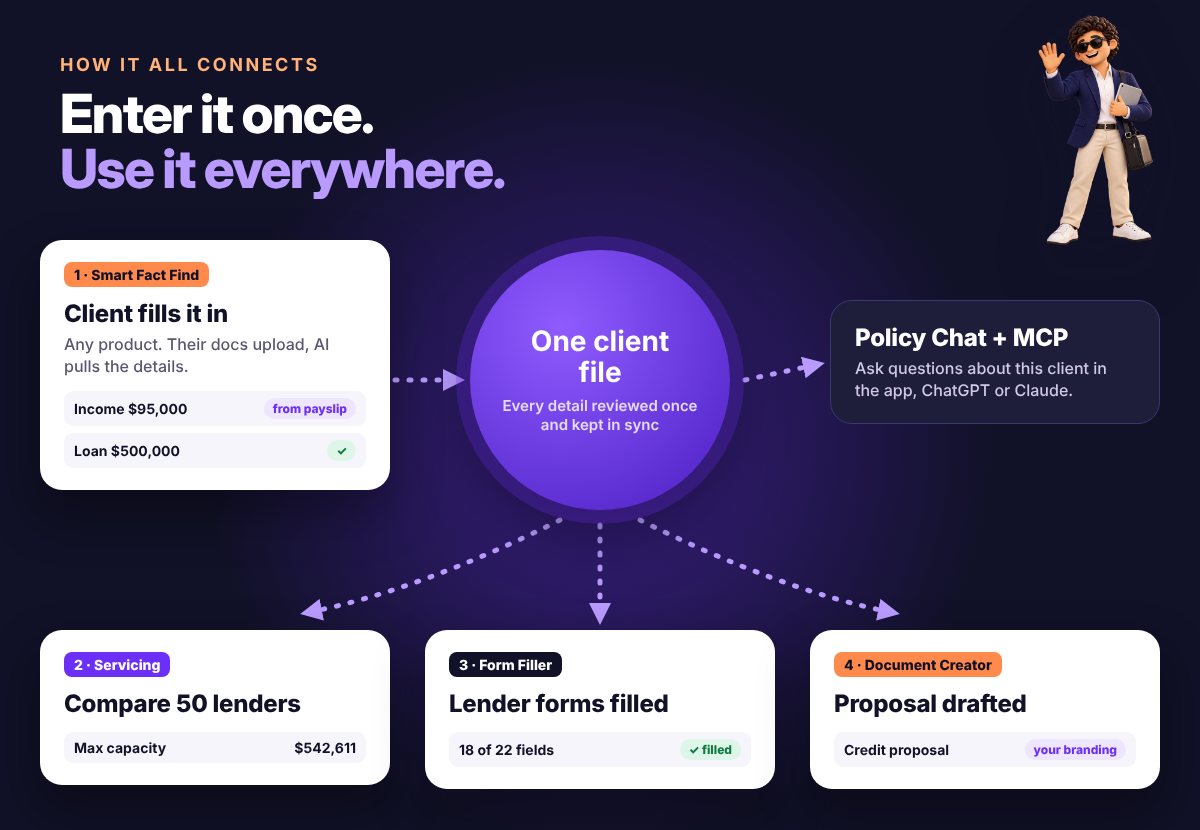
- It goes beyond policy: pre-vet a deal across the panel, build the client file and open the deal without leaving the chat.
- MCP access is included in every CreditPolicy.ai plan. Code OCTOBER14 gives 14 days free until 31 October.
What’s actually changed
Back in September, CreditPolicy.ai switched on its MCP connector, the piece of plumbing that lets an AI assistant talk directly to its lender-policy library and a broker’s own client book. Early adopters had to add it by hand as a “custom connector”, pasting in a server address.
CreditPolicy.ai has now been approved for Claude’s connector directory, the curated list of tools that Claude users can browse and switch on with a click. In practice that means:
- Claude: open Settings, then Connectors, click Browse connectors, search for CreditPolicy and hit Connect. Sign in, approve, done.
- ChatGPT and Perplexity: directory submissions are in and awaiting approval. You don’t have to wait, though. Both connect today as a custom connector using the same server URL.
- Everything else that speaks MCP: Gemini, Microsoft Copilot, Cursor, VS Code, Grok and Windsurf, plus automation platforms like Make, Zapier and n8n, all connect to the same endpoint.

CreditPolicy.ai is the first Australian lender-policy platform approved in Claude’s connector directory. As far as the team is aware, no other broker policy tool in the Australian market offers an MCP connection of any kind, let alone one covering commercial, asset, personal and private alongside resi.
MCP in plain English
MCP stands for Model Context Protocol. It’s an open standard, now supported by every major AI assistant, that lets an AI safely reach outside itself to use a specific tool or data source.
The easiest way to think about it is a USB-C port for AI. You plug a source in once, and any compatible assistant can use it. Without MCP, a general AI answers a lender question from whatever it absorbed from the internet during training, which may be months old and was never the lender’s actual credit policy to begin with. With CreditPolicy connected, the assistant stops guessing. It sends your question to your CreditPolicy library, reads the lender’s own wording and hands back an answer with the document it came from.
You don’t need to know any of this to use it. You just ask your question the way you normally would.
Why this is a big deal for brokers
Generic AI is brilliant at writing and dangerous at policy. Lender appetite moves weekly. A confident, plausible and wrong answer on a self-employed LVR cap or the treatment of HECS debt doesn’t just waste time: it costs you a valuation, a credit decline, and a very awkward call with a client who thought it was sorted. Here’s what a connected policy library changes.
It can’t invent a policy
Every answer comes back with the source document from your library. If the library has nothing on it, it says “not in library” instead of filling the gap with a guess.
It’s where you already work
Drafting the client email in Claude? Ask the max-LVR or casual-income question in the same breath and keep writing. No tab switching.
It covers the whole book
Residential, commercial, asset finance, personal and private: 160+ lenders including 60+ private lenders. Most policy tools stop at resi.
It knows your clients
Pull up a client file, see what’s missing, and read their actual numbers against a lender’s wording. The answer is about Sarah’s deal, not a hypothetical.
It pre-vets before you lodge
Describe a deal in plain English and get lender-by-lender verdicts with criteria met and unmet. Dead-end submissions die in the chat, not at credit.
It chains the whole task
“Set them up, tell me who’d approve, open the deal and draft the follow-up.” One prompt, several tools, and you’re not the one copying between tabs.
That last point is the one brokers tend to underestimate. CreditPolicy exposes more than 20 tools to your assistant across the policy library, your client book and your deal pipeline: searching and comparing policy, assessing scenarios, creating and updating clients, recording people, companies and trusts as separate records with explicit relationships, setting who is borrower or guarantor on each scenario, running servicing, and opening and moving deals. Your assistant decides which to call, and in what order.
How to connect CreditPolicy to Claude in 60 seconds
You’ll need a CreditPolicy.ai account (a trial works) and a Claude account. Connector availability on the Claude side depends on your Claude plan.
- 1Open Claude’s connectors. On claude.ai or Claude Desktop, go to Settings, then Connectors. Or jump straight there: claude.ai/settings/connectors.
- 2Find CreditPolicy. Click Browse connectors, search for “CreditPolicy” and click Connect.
- 3Sign in and approve. Log in to your CreditPolicy.ai account when prompted and click Approve. There are no API keys to copy or paste.
- 4Start a new chat and ask. Claude will call CreditPolicy whenever a question needs lender policy. If you want to be sure, start with “Using CreditPolicy, …”
Connect once on claude.ai and it follows you to Claude Desktop and the Claude app on your phone. Can’t see it in the list yet? Choose Add custom connector and paste the server URL:
Using ChatGPT or Perplexity?
Both directory listings are awaiting approval. In the meantime, add CreditPolicy as a custom connector in ChatGPT’s Apps and Connectors settings (where your plan supports it) or in Perplexity’s connector settings, using the same URL, then sign in to CreditPolicy when asked. For tools that can’t do one-click sign-in, such as some desktop and automation setups, CreditPolicy issues a personal access key from your account instead.
Five things to ask on day one
The fastest way to see the difference is to ask something you already know the answer to, then something you don’t. Try these:
Notice what comes back: lender names, the exact wording, the document it came from, and a clear flag on anything the library doesn’t cover. That’s the bit a general chatbot can’t give you.
Where the guardrails sit
Plugging policy into your AI doesn’t change who carries the obligation. Under the Best Interest Duty, the recommendation is still yours, and ASIC expects you to be able to show how you got there. Used well, a cited answer actually makes that easier.
Treat the citation as the start of the check, not the end of it. Open the source, confirm the current wording against the facts that matter for this client, and confirm with the lender before you submit.
Keep the trail. Every MCP conversation lands in your CreditPolicy Saved chats beside your web and email chats, which makes it simple to reference in your file notes.
Know what it can and can’t touch. The policy library is read-only. On your own client files it can create and update records, scenarios and documents, and every change is logged and can be undone. It can never delete policy content, change your subscription or act as you anywhere else, and you can revoke access at any time.
Mind the privacy settings. When your assistant pulls client details into a conversation, that conversation sits with your AI provider. Check your Claude or ChatGPT data controls and your licensee’s AI policy before you start working client files through it.
What it costs
Nothing extra. MCP access is included in every CreditPolicy.ai plan and uses the same credits as the app.
For individual brokers
For brokerages of 3 to 25

Code OCTOBER14 extends the standard 7-day trial to 14 days for new trials started by 31 October 2026. 25+ brokers or an aggregator group? Brokerage pricing includes unlimited seats and API access.
The bottom line
For the past two years “AI for brokers” has mostly meant a chatbot that writes nicely and guesses at policy. Connecting a cited, Australian lender-policy library directly into the assistant you already use flips that around: the writing stays just as quick, and the policy answers stop being a gamble.
Claude is live now, ChatGPT and Perplexity are close behind, and nobody else in the Australian market is offering it. If you’ve got ten minutes between appointments this week, connect it, ask it something you already know, then ask it the question that’s been sitting on your desk.
FAQ
Do I need a paid Claude plan?
Connector availability is set by Claude and depends on your Claude plan, so check Settings, then Connectors in your account. On the CreditPolicy side, MCP access is included in every plan.
When will ChatGPT and Perplexity be in their directories?
Both submissions are awaiting approval. You can connect either one today as a custom connector using https://creditpolicy.ai/api/mcp and signing in to CreditPolicy.
What if a lender’s policy isn’t in the library?
It tells you. CreditPolicy is built to cite or abstain, so you’ll see “not in library” rather than a made-up answer. You can then go to the lender or BDM directly.
Does it cover commercial, asset and private, or just home loans?
All five: residential, commercial, asset finance, personal loans and private lending, across 160+ lenders including 60+ private lenders.
Can it lodge applications with lenders?
No. It researches policy, pre-vets scenarios and helps build the client file and deal, but submission stays with you.
Can I switch it off?
Yes. Disconnect it in your assistant’s connector settings or revoke access from your CreditPolicy account at any time.
Interactive · Connect & ask
Set it up in your AI, then build your first prompt
Pick the assistant you use for the exact steps, then choose a lending type and a job to get a ready-to-paste prompt.
Claude
● Approved · in Claude’s connector directory- Open Settings, then Connectors.
- Click Browse connectors and search “CreditPolicy”.
- Click Connect, sign in to CreditPolicy.ai and Approve.
Example lenders and numbers are placeholders. Swap in your client’s details. Answers come from your CreditPolicy library and should be confirmed with the lender before you submit.
Code OCTOBER14 gives you 14 days free until 31 October.
Disclaimer: This is sponsored content produced for CreditPolicy.ai. It is for general information and professional development purposes only and does not constitute legal, compliance, or financial advice. Brokers should consult their aggregator’s compliance team and, where required, seek independent legal advice regarding their obligations under the National Consumer Credit Protection Act 2009 and ASIC’s responsible lending guidelines. Always confirm current lender requirements with the lender before submitting.