File 01 · Make blueprintImport
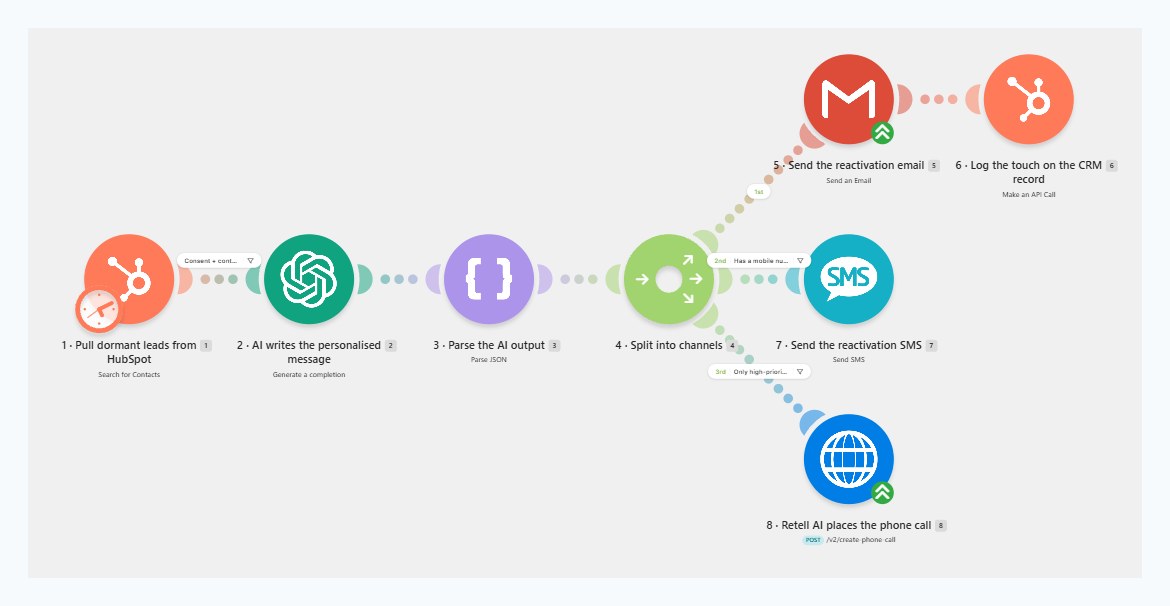
Nine modules, already connected. You upload the file. You do not drag a single module.


The AI Lead Reactivation Engine For every major broker CRM
 Make
Make
 Zapier
12 CRMs
Zapier
12 CRMs
For Australian mortgage brokers
An automation that emails, texts and AI-phone-calls every dead lead in your CRM, reads what comes back, and hands you only the people ready to talk. You set it up once, on a Tuesday morning, and then you stop thinking about it.
How the engine turns dormant enquiries back into real conversations, by email, SMS and AI phone.

Built for real broker teams
One broker or a team of nine, the engine works the same way. It goes back through the people who already enquired, restarts the conversation properly, and hands you only the ones worth your afternoon.
You are not buying software that watches your pipeline. You are buying the follow-up you keep meaning to do, done properly, for eight hundred people at once, in your own words.

The conversation you are not having, with people who already raised their hand.
The problem
Hundreds, often thousands, of people who once enquired about finance, never converted, and have not heard from you since.
You paid for those leads. You already have permission to contact them. Some of them have since bought a house with somebody else. Some are still looking. You do not know which, because following up eight hundred people by hand is nobody’s idea of a Tuesday.
So the list sits there, quietly going stale, while you spend money acquiring new leads that cost ten times more than the ones you already own.
The uncomfortable part. Your dormant list is not neutral. Every month you leave it alone, more of those people settle a loan with somebody who did bother to follow up.
Do the sum first
Conservative settings. 1,200 contacts, 65% gone quiet, a 3% reply rate, and only one in five real conversations turning into a settlement.
Assumes a $600k average loan, 0.65% upfront and 0.165% trail. Your numbers will be different, which is exactly why we built you a calculator instead of asking you to trust ours.
What actually goes out
The AI reads what you already know about the lead and writes to that. Here is genuine output from the engine, unedited.
Hi Sarah,
We spoke back in March about finance for the Brunswick apartment, and then things went quiet on my end more than yours.
A lot has changed with servicing since then, so if you are still looking I would happily run fresh numbers for you. No charge and no obligation, just so you know where you stand.
Worth a quick chat?
Matt
The half everyone forgets
A second workflow catches every response, works out what the person actually meant, and routes it. This is the part that turns a campaign into a system.
Deal created, note written, and you get pinged. Nothing else in your day changes.
Tagged, nurtured, and put back in the queue for a later touch.
Parked for ninety days, then quietly picked up again.
Suppressed immediately and permanently. No second chances, no accidents.
One lead, end to end
This is what happens to a single dormant contact from the moment the engine picks it up.
Multiply that by eight hundred, running quietly in the background, while you get on with the files already on your desk.
The install
Two JSON blueprints come in the pack. Drop them into Make and the entire engine appears on the canvas, already wired — every module, every safety filter, every prompt, every field mapping. You set one thing: your own definition of dormant. These are the real scenarios, screenshotted from a working account.
Nine modules, already connected. Pull dormant leads, gate them on consent, write the message, split into email, SMS and phone, log it back to the CRM and stamp the record so nobody gets hit twice.
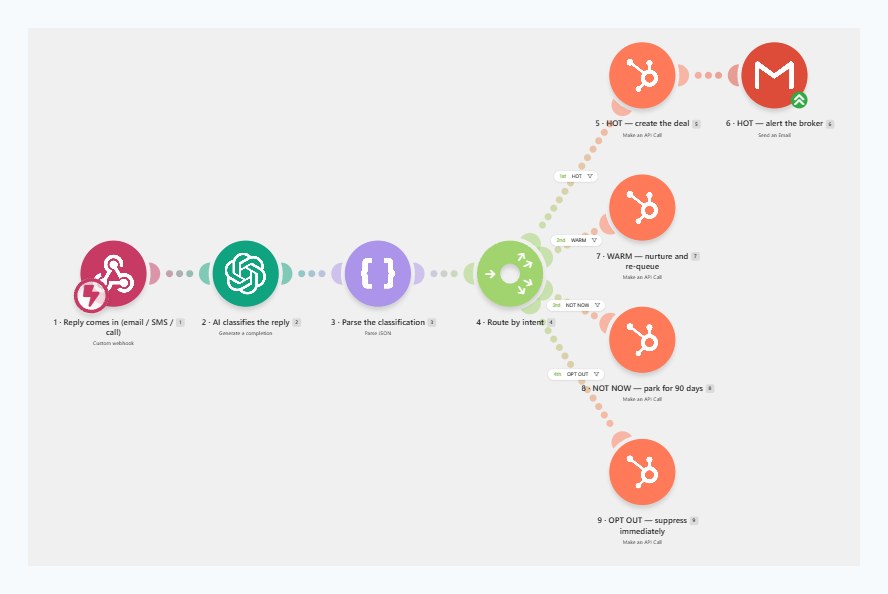
Ten modules and four routes, already connected. A reply lands, the AI reads it, and it goes hot, warm, park it or suppress — without you touching anything.
Create a new scenario... menu on the empty canvas, then Import BlueprintAbout four minutes per scenario. On Zapier there is no import file — Zapier does not allow it — so the Zapier guide walks you through the identical build screen by screen, with a real screenshot of every single click. Longer, but nothing is left to guess.
$399 → $149 · one-time · instant download
Open the box
Not a course. Not a PDF of ideas. The working files, the finished scenarios and every word the system will ever say — already written, already tested, already wired up.
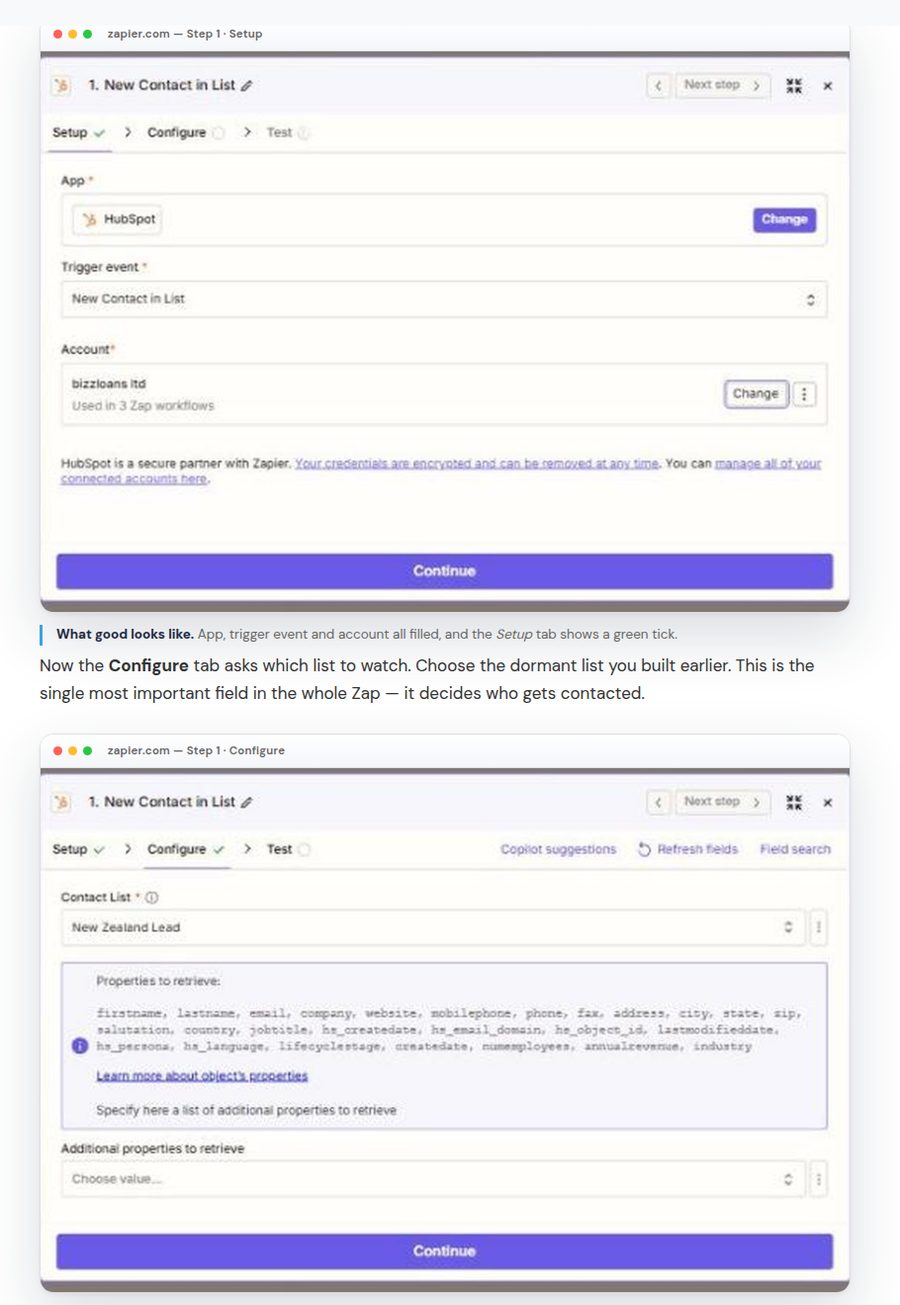
You type two things. Your first name and your business name. They are flagged as [YOUR FIRST NAME] and [YOUR BUSINESS NAME], and the guide tells you exactly where they are. That is the whole of the writing you have to do.
Automation consultants in Australia sit around $150–$250 an hour, and a two-workflow build with AI prompts and CRM mapping is a 15–25 hour job.
Most of it is not the wiring. It is writing the messages, testing the prompts, and working out the compliance wording without getting it wrong.
Import two files, connect your accounts, change two placeholders, test it on yourself. That is the job.
Those rates and hours are indicative, not a quote — get your own if you want to compare properly. The point is only that the expensive part of this was never the software.
Compatibility
The pack includes a scenario for each major broker CRM. Only the first step and the last step touch your CRM. Everything in between is identical no matter what you run.
Straight answer about the closed ones. Some aggregator-owned platforms will not let an automation read them directly, and that access is granted by the aggregator, not by you. For those, the pack ships the bridge method: you export your dormant leads to a Google Sheet and the engine reads that instead. Everything downstream is identical, and it works everywhere without needing anybody’s permission.
What lands in your inbox
This is a complete, do-it-yourself pack. Everything you need is in it, and there is nothing else to buy.
How the twenty minutes goes
Two JSON files into Make. Or open the Zapier guide if that is your platform.
Your CRM, OpenAI, your mailbox, your SMS provider, and Retell AI if you want the phone channel.
Replace two placeholders with your name and business. Adjust the tone lines if you want to.
Add yourself as a contact, run it once, read what it writes. Reply STOP and watch it suppress you.
Twenty-five leads a day for the first week, then as many as your inbox can handle.
$399 → $149 · one-time · instant download
Who made this
The Broker Times covers what is actually happening in Australian broking: aggregator platforms, compliance, lender policy, and the tools brokers are quietly using to get their week back.
This engine came out of that. It is built around Australian rules, Australian language, and the specific mess of a broker CRM that has been running for six years. Not a generic sales sequence with the word “mortgage” pasted in.

Runs the same whether you are one broker or a team of nine.
You have a few hundred old enquiries gathering dust, you are comfortable connecting one app to another, and you would rather spend forty minutes once than chase people by hand forever.
You want somebody to build it for you. This is deliberately do-it-yourself and we do not sell installs, which is the only reason it is $149 and not $2,000. Also skip it if you were hoping to point it at a purchased list. It will not do that.
Email us within 30 days of purchase and we will refund you in full. You keep the files. We would rather you had a good experience than $149 of ours you resent, and it is the same guarantee we put on everything else in the shop.
Before you buy
No, but you do need to be the kind of person who has connected two accounts together before, or is willing to follow a guide carefully for forty minutes. If that is not you, this is not the right product and we would rather tell you now.
Roughly seven Make operations plus a fraction of a cent of OpenAI per lead contacted, on top of your own SMS and call charges. For most brokers that lands in the low tens of dollars a month. The leads themselves cost nothing, because you already own them.
The engine is built around consent. It only contacts people already in your CRM, every message carries an opt-out, opt-outs are honoured immediately and permanently, and the pack includes a checklist covering the Spam Act, the Privacy Act and the Do Not Call Register. It is your database and your licence, so you make the final call, but the guardrails are built in rather than bolted on.
The prompts forbid quoting rates, giving advice, promising approvals and manufacturing urgency. Before you go live you run it on yourself and read the output. We tell you to read the first ten messages it writes to real people, and you should.
Yes. The pack includes a scenario for each major broker CRM in the grid above — Salestrekker, BrokerEngine, HubSpot, Salesforce, LMG, Connective and the rest. If yours is not on the list, a spreadsheet bridge is included as a fallback.
It does not log into your CRM. You drop a CSV (or type the numbers) and it is read in your browser — nothing is uploaded. It looks for an email column, a mobile column and a date column, and counts anyone older than six months as gone quiet. After you buy, Make or Zapier filters the live CRM the same way (last contacted, status, not already a client) and the AI writes the outreach.
A ZIP, on screen the moment you pay, and emailed as well. Two Make blueprint files, both setup guides as PDFs, the prompt library and the compliance pack. Twenty-three files. Bookmark the download page and you can re-download any time.
No. We have kept it do-it-yourself on purpose so the price stays where it is. Everything you need is in the guides.
Because it is new. $399 is what it is worth against a single settlement, and $149 is the Broker Times reader launch price. Buy now and later updates are free.
$399 → $149 · one-time · instant download

What it is all for
Every automation on this page exists to produce one thing: a person who already knows your name, picking up and saying yes, actually, we are still looking.
Monday morning. Three replies came in over the weekend. The engine already read them, sorted them and wrote the CRM notes, so the only decision left is which one you ring first.
The leads are already there
Two blueprints, both guides, the prompt library and the compliance pack. One payment, instant download, yours to keep, and thirty days to change your mind.
Or run the free Dormant Lead Audit and see what your own list is worth first.
The AI Lead Reactivation Engine is an educational and productivity product. It is not legal, compliance, credit or financial advice. You remain responsible for your own compliance with the Spam Act 2003, the Privacy Act 1988 and the Do Not Call Register Act 2006, and for reviewing what the system sends on your behalf. Make, Zapier, HubSpot, Salesforce, Pipedrive, Zoho, Salestrekker, Connective, LMG, Effi, Finsure, ActivePipe, BrokerEngine, AFG, OpenAI, Retell AI and Stripe are the property of their respective owners and are shown to indicate compatibility only. The Broker Times is not affiliated with or endorsed by them. Example messages shown on this page are illustrative output from the engine and do not depict real clients.